Showing posts with label Computer. Show all posts

Saturday, May 9, 2015

Internet Sharing Peer To Peer Using Wifi on Windows 7

Back again after so long did not write the article. This time I will be sharing how sharing WIFI adhoc peer to peer.Needs to know  Internet sharing  not only with  lan cable but can also use WIFI. this step by step.

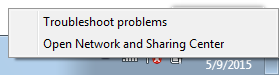
1. Right Clik  on Wifi Icon and choose Open Network and Sharing Center


2. Set A new Connection or Network and Choose Set Up Wireless ad hoc


3. Clik Next Untill asked network name and Scurity

Input Network Name and scurity  that you want


4.  After you fill up all, Clik  next and finally done, good luck


NOTE: Internet sharing with peer to peer ad hoc above use laptop to laptop only or personal computer with wifi injected. For smartphone tablet cant use tutorial above.

Thursday, November 21, 2013

Trik Mengatasi Download IDM yang Sudah 99,99% Macet

Temen Temen Sering download  dah  hampir selesai macet? 99,99% macet? kalo file cuman 2 MB 3MB gak terlalu pusing  masalahnya kalo dah dowload nyampai 3 Gg, waduhhh dah nunggunya lama bikin pusing aja ni ada salah satu solusi untuk mengatasi masalah itu pertama  download dulu freegate fersi terbaru  kalo aku pake yang ini fregate 7  silahkan temen temen cari yang terbaru, setelah itu  buka aja tu freegate seperti biasa. kemudian  buka idm kalian
pada menu downloads-->options--> proxy setting seperti gambar di bawah ini, ketik ok silahkan lanjutkan downloadnya

Sunday, January 1, 2012

Macam-macam Database

Project Database
Seiring dengan kemajuan teknologi hampir semua software maupun sistem informasi baik itu berbasis desktop ataupun berbasis Web harus diintegrerasikan dengan data base. Dimulai dari perkembangannya pertama kalinya data base pertama diciptakan oleh seorang yang jenius yaitu Larry Ellison dengan oraclenya. sampai sekarang teknologi database paling bagus dan paling baik adalah oracle. Seiring dengan perkembangan zaman banyak vendor-vendor perusahaan IT dunia berlomba-lomba untuk membuat database ternama lainnya salah satunya adalah Sql server punya Microsoft dan lain sebagainya.

Selengkapnya Daftar Database Baik yang berbayar maupun yang versi Gratis alias Open Source
1. Oracle 
2. Sql Server
3. Mysql
4.Microsoft Acces
5. Firebird
6.PostgreSQL

Wednesday, December 21, 2011

Mengatasi Ekstensi .CHK pada Flashdisk

Begini ceritanya,  Ada saudaraku yang disuruh untuk memfoto pesta perkawinan saudaranya. dia ditugasi untuk memfoto dan menyuting  acara pesta perkawinan saudaranya. Ketika sudah selesai memfoto dan menyuting, kebetulan dia hanya memakai  handycam, kartu memori yang ada di handycam di cabut langsung dipindahkan ke flash disk barunya, apesnya tidak memindahkan file foto dan videonya ke komputer dulu, dia langsung memindahkan file foto tersebut di cut langsung  ke flash disk miliknya. hehehe bagaimana mau mindahin ke komputer dulu wong dia pas mindahin file-filenya juga di warnet jadi dari kartu memori langsung di cut ke flashdisk. setlah selesai  meng cut file tersebut dia kaget file-file yang ada di flashdisk kok nggak ada malahan hilang semua alias tampilan dalam flash disk kosong. kemudian dia cek beberapa kali tancap masuk tetep nggak ada, sampai dia ke warnet lain tetep juga ga muncul tu file, tetapi dalam propertis di flash disk masih ada isinya.

Suatu ketika dia bertanya kepadaku tentang masalah itu ya aku jawab sederhana "paling paling ke hidden" sesuai pengalamanku kebanyakan flasdisk yang kaya gitu pasti file-filenya di hidden sama virus saya jawab pilih tool ==> view dan show hidden file  pasti bisa. Ternyata di coba-coba tetep nggak bisa muncul. Kemudian dia datang ke kosku langsung bawa flashdisknya dan aku praktikkan sesuai pengalamanku tak di show hidden file, show protected system, show extension tetep ga bisa kebukak, kemudian aku coba pakai attrib yang ada di dos tetep nggak bisa keluar. Hampir aku frustasi ku coba pakai windows Xp kemudian ta coba seperti diatas eh muncul folder dengan nama found.000, aku sempet seneng pas dah muncul folder tersebut, tetapi timbul masalah baru lagi yaitu semua file yang ada di dalam folder found.000 tersebut berextensi .CHK, file apa itu dalam benakku.

Kemudian saya punya inisiatif mengubah extensi CHK menjadi .jpg dan .mov karena sepengatahuan saya file poto yang defalut pada handycam adalah jpg dan videonya adalah mov jadi untuk file-file yang berukuran kecil saya beri extensi.jpg dan file yang rada besar aku beri extensi .mov, aku gembira sempat berhasil tetapi masih ada yang tidak bisa dibukak, Aku coba searching di google dan cari tahu apa itu format CHK ternyata file tersebut adalah extensi untuk recoveri pada windows untuk mengembalikannya anda bisa menggunakan aplikasi cukup ringan dan kecil yaitu unCHK cara penggunaannya cukup mudah file tersebut di extak di dalam folder yang filenya berextensi chk  tersebut  tinggal run tunggu proses recovery untuk menggunakannya anda bisa mengunduh di sini

Tapi kalau filenya hanya sedikit dan kita sudah tau extensi file tersebut, kita tinggal merename aja extensinya tetapi jika file nya banyak misalnya 500 atau lebih saya sarankan untuk memakai aplikasi tersebut

Monday, December 19, 2011

Sistem Informasi Stok Barang Sederhana dengan Delphi

Bagi temen-temen yang seneng dengan Pemrograman Delphi, ni ada contoh sistem informasi stok barang dengan delphi, sebenarnya ini adalah tugas kuliah aku, jangan diketawakan ya soalnya aku masih belajar bagi yang berminat bisa di unduh di sini

Tuesday, December 13, 2011

TIP TRIK FB. Mengganti Poto profile Menggunakan Hand Phone

Mungkin dari kalian semua sudah pada jagao dengan Facebook, ya aplikasi jejaring sosial nomer satu di dunia ini telah menghipnotis para penggunanya dengan berbagai macam layanan yang ada di dalamnya. Pada awalnya pengguna facebook hanya pada pengguna desktop atau komputer biasa, namun untuk sekarang ini kita juga dapat menggunakannya di hp kita masing-masing, karena hampir semua dari kita pada saat ini sudah mempunyai hp dan belum tentu memmpunyai kompuuter. mungkin itu juga menjadi suatu alasan dari pihak facebook untuk menambah anggotanya lewat hp.

Bagi pengguna facebook yanng menggunakan komputer mungkin tidak mendapatkan kesulitan untuk menjalankan  semua layanan yang ditawarkan dari facebook mulai dari chat, game, video call dan lainnya. Namun bagi pengguna hp banyak layanan yang tidak dapat diakses melalui hp, sebagai contoh untuk yang begitu kecil dan sepele yaitu mengganti poto profil. Banyak temen-temen yang belum tau bagaimana cara mengganti poto profil mereka melalui hp, bahkan sebagian dari mereka pergi ke warnet atau jasa internet lainnya hanya ingin merubah poto profil mereka.

Untuk masalah ini ada solusi buat anda yang menggunakan hp dan ingin mengganti poto profilnya di hp
1. Buka web browser di hp anda, saya sarankan menggunakan opera mini karena tampilannya akan penuh.
2. Tulislah http://facebook.com/editpicture.php di addres browser anda kemudian klik ok
3. Setelah itu anda disuruh untuk login terlebih dahulu, setelah login tampilan yang muncul pertama kali adalah tampilan untuk merubah poto profil tersebut. 

4. Kemudian  ambil poto yang ada di hp, ingat sebelum masuk ke facebook ingatlah nama foto yang akan anda upload karena ketika kita brows poto tidak akan terlihat tampilan poto tersebut seperti halnya tampilan thubnail yang ada di komputer, tetapi hanya namanya saja yang terlihat.
5. dan selesai, bagi anda yang kebetulan lagi internetan pake hp bisa langsung coba di sini


Monday, December 5, 2011

Membuat Aplikasi Media Player Sederhana Dengan Delphi

Delphi merupakan suatu aplikasi yang sangat mudah untuk kita membuat aplikasi-aplikasi lain. pada kali ini saya membuat sebuah aplikasi sederhana media player dengan delphi. media player ini bisa untuk memutar  file-file musik seperti mp3 dan file video untuk screen shootnya sperti ini


Bagi yang mau source kodenya di sini

Thursday, November 17, 2011

Another proud achievement of Indonesian students. as quoted surabaya.detik.com, students from colleges ITS managed to become the common prison, mini car with a liquid-fueled  household bleach, as a result they become champions in racing Indonesia Chem E-Car Competition 2011 which was held at the ITS(Surabaya Institut of Technology). More proud of this achievement because the participants apart from the popular universities in the country such as UGM, UI, ITB also from abroad namely Malaysia's Petronas University of Technology.

Friday, November 11, 2011

Solution Over Heating in Windows 7 for Any Laptop

for users of laptop you may have experienced cases in latopnya Over heating, especially if you use windows 7. yes overheating, a problem which is quite troublesome, if the computer or laptop is overheating we have all our work seemed to be slow, as the plane seemed to walk. but wait a minute I have a solution to this problem.
the first steps:
1. check whether the wind drains dirty or not, if dirty clean using a compressor or other
2.
use coolpad  on your laptop is extremely helpful to better cool your laptop to avoid overheating.

The second step:
if the first step does not run smoothly it is better to try this step
1. power option click on more power option


\2. then click change plan setting
3. then choose change advanced power setting
4. in power options change percentage maximum processor state become 80% on battery  and Plugged in


I proved succesful,  good luck

Tuesday, November 8, 2011

Dennis M. Ritchie


Even the layman, computer science students would rarely know Dennis M. Ritchie. do you know all abahwa Dennis M. Ritchie is pencita of the C programming language is very popuer which later evolved into C + + and Java. he also became one of the unix operating system developers that develop into open source now, the news of his death is not flamboyant obituary steve jobs. that happened three days later than the death of steve jobs. It becomes a question for a number of people in the field of computers all the more for users of Open Source.

to more clearly see this link Dennis M. Ritchie Dead

Monday, November 7, 2011

Manual Setting GPRS and 3G for Indonesian Provider


Image GSM GPRS CDMA CDMA2000
By Admin

AXIS

for Setting Manual GPRS

Connection Name: AXIS (or Any)
Data Bearer: GPRS (Paket Data) atau PS
APN: AXIS
Username: AXIS
Password: 123456
Authentication: Normal
Proxy Address: 10.8.3.8
Proxy Port: 9201 atau 8080
Homepage: http://wap.axisworld.co.id
Connection Security: Off
Session Mode: Permanent

for Setting Manual MMS

Connection Name: AXISmms(or Any)
Data Bearer: GPRS (Paket Data) or PS
APN: AXISmms
Username: AXIS

Prompt Password: No
Password: 123456
Authentication: Normal
Proxy Address: 10.8.3.8
Proxy Port: 9201 atau 8080
Homepage: http://mmsc.axisworld.co.id
Connection Security: Off
Session Mode: Permanent


3 THREE

for Setting Manual GPRS 3 Three

Profil Name: 3 GPRS (or Any)
APN: 3gprs
Proxy Server Address: 10.4.0.10
Proxy Port Number: 3128
Data Bearer: GPRS (Paket Data)
Username: 3gprs
Password: 3gprs
Homepage: http://wap.three.co.id

for Setting Manual MMS 3 Three

Profil Name: 3 MMS
APN: 3mms
Proxy Server Address: 10.4.0.10
Proxy Port Number: 3128
Data Bearer: GPRS (Paket Data)
Username: 3mms
Password: 3mms
Homepage: http://mms.three.co.id


Indosat MENTARI


for Setting Manual GPRS Mentari

Profil Name: Indosat GPRS(or Any)
APN: indosatgprs
Proxy Address: 10.19.19.19
Port Proxy: 8080
Data Bearer: GPRS (Paket Data)
Username: indosat
Password: indosat
Homepage: http://wap.klub-mentari.com


for Setting Manual MMS Mentari

Profil Name: Indosat MMS
APN: indosatmms
Proxy Address: 10.19.19.19
Port Proxy: 8080
Data Bearer: GPRS (Paket Data)
Username: indosat
Password: indosat
Homepage: http://mmsc.indosat.com


Indosat IM3


Parameter Setting Manual GPRS IM3

Connection Name: M3-GPRS(or Any)
APN: www.indosat-m3.net
Username: gprs
Password: im3
Proxy Address: 10.19.19.19
Proxy Port: 9201 atau 8081
Homepage: http://wap.m3-access.com


for Setting Manual MMS IM3

Connection Name: M3-MMS
APN: mms.indosat-m3.net
Username: gprs
Password: im3
Proxy Address: 10.19.19.19
Proxy Port: 9201 atau 8081
Homepage: http://mmsc.m3-access.com

or you can use for global indosat(mentari,Im3)
here


APN: indosatgprs
User : indosat
Pass : indosat
Proxy : 10.19.19.19
Port : 8080/8580
Homepage : http://wap.indosat.com

APN: indosatmms
User : indosat
Pass : indosat
Proxy : 10.19.19.19
Port : 8080/8580
Homepage : http://mmsc.indosat.com


TELKOMSEL

Parameter Setting Manual GPRS Telkomsel

Profil Name: TSEL GPRS(or Any)

Data Bearer: Packet Data
APN: telkomsel
Username: wap
Prompt Password: No
Password: wap123
Authentication: Normal
Gateway IP Address: 10.1.89.130

Proxy Serv. Address: 8000
Homepage: http://wap.telkomsel.com
Connection Security: Off
Session Mode: Permanent

for Setting Manual MMS Telkomsel

Profil Name: TSEL- MMS (ar Any)

Data Bearer: Packet Data
APN: telkomsel
Username: wap
Prompt Password: No
Password: wap123
Authentication: Normal
Gateway IP Address: 10.1.89.130

Proxy Port Number: 8000
Homepage: http://mms.telkomsel.com
Connection Security: Off
Session Mode: Permanent


XL

Parameter Setting Manual GPRS XL

Profil Name= XL GPRS(or Any)
APN: www.xlgprs.net
Username: xlgprs
Password: proxl
Proxy Server Address: 202.152.240.50
Proxy Port: 8080/8580
Homepage: http://wap.lifeinhand.com
Data Bearer: GPRS (Paket Data)

for Setting Manual MMS XL

Profil Name= XL MMS(or Any)
APN: www.xlmms.net
Username: xlgprs
Promt Password: No
Password: proxl
Proxy Server Address: 202.152.240.50
Proxy Port Number: 8080/8580
Homepage: http://mmc.xl.net.id/servlets/mms
Data Bearer: GPRS (Paket Data)

for CDMA
smart
IP :10.20.27.250
port :8080/8580/8085
dial :#777 or 777 or #99
username : wap/smart
password :wap/smart

Freen
IP :10.20.27.250
port :8080/8580/8085
dial :#777 or 777 or #99
username :M8
password :M8
Browser Suppoorted HTML 5 Page Rank

Web Browsers are now increasingly heated competition. In connection with the issue or the development of HTML5 browser developers began vying to further enhance the ability and completeness of features on the browser to more support for HTML5. as it is known that HTML5 HTML5 is a new technology that is now still in progress. For browsers that are widely used browser in the virtual world are competing to be the best for the user and updating to better support into HTML5.

Here's a list ranking the best browser that supports HTML5 by html5test.com updated on aug 23th 2011

1st (First Place) : Google Chrome
Version 14.0.835
value : 340


2nd Mozilla Firefox
version 7
Value : 313


3rd Safari
Version 5.1
Value 293


4th
Opera mini
Version 11.50
Value : 286


5th Internet Eplorer
Version 9
Value :141


Sunday, November 6, 2011

Speed up Booting Windows

Any Problem about your booting Windows. must be waiting 3-4 minute hehehe


several tips for speed up your booting windows
1. Open Run
type "msconfig" OK
in start up tab unchecked all program
in service tab unchecked unnecessary services
2. Type in Run "regedit"
in "Edit" ==>"find "then type enableprefetcher
change extension integer from 3 becomes 5
good luck .....!!!

10 Free Top Blog


For blogers actually know about blog, yea,,,, place for pouring our imaginations,creativation,skill, knowledge and so many things we can pouring them at the blog.
There are many blog service providers in internet. If you all interested about blogging,I just recomended you for joining Free Blog.

Top 10 of blog service providers five International and the else from Indonesia
1. Blogger.com (Google Inc)
2. Wordpress.com (Wordpress)
3. my.opera,com (Opera)
4. Multiplay.com
5. LiveJournal.com
6. Blogdetik.com (detik.com)
7. Kompasiana.com (Kompas tbk)
8. lautanindonesia.com (Lautan indonesia)
9. inilahkita.com
10. dagdigdug.com

Monday, October 31, 2011

Why Mac Os not susceptible to virus

Mac Os (Macintosh Operating System) is an operating system owned by Apple Corporation, the largest IT companies for now after nearly two decades continue under the shadow of Microsoft. Progress made by Apple is nothing but simply because their products are excellent with great design.

Many advantages if we use apple notebook which means using the operating system macintos. In addition to the quality it has very good hadware opersinya system including one of the most perfect for now. Keep in mind now has released the newest version of Mac Os X Lion has increased quite dramatically from previous versions. One of the most attention is its safety.
Mac OS is designed with security oriented, not plagued by constant attacks from PC viruses and malware. The purpose of security is integrated security oriented, but does not slow the system performance. When using a mac Os in our notebooks, Apple will support security in the Internet network, and at that apple also update its security system and delivered to our system so we do not need anti-virus to secure our systems.

Actually, when compared with other major operating systems like windows and linux security mac Os is almost the same for now, in contrast to the previous version (before version X Lion) instead worst safety. One other reason that the mac Os are not easily attacked by a virus is that users mac Os is still small, in one survey the field of IT companies in the world Os mac users only about 8% s is the reason the hackers and crackers are lazy to make a virus or malware attack mac Os, unlike windows users more than 80% of the world, crackers would prefer to make a virus or malware for windows Because they target a lot. Windows also has a good security system but many users, especially in Indonesia to choose the pirated so Microsoft does not support keamaman especially ignored.

The media spread of the virus There were only two of offline and online. For online media users never have to worry mac Os aka tone malware attacks and Karen was there support from Aplle that help security. For most offline media distribution over the network medium (lan, wireless, bloetooth etc.) as well as the exchange flashsdis, and even then very limited and very rarely can be transmitted because of a virus in windows can not work on mac Os that fact more windows users than the User mac Os . So when we use the mac Os and our many friends who use windows there is no reason for us to dizzy dizzy thinking about computer viruses

Saturday, October 29, 2011

Several kinds of web server


For computer lovers, especially who like to network degan certainly no stranger to the web server. When you want to try to make good web pages other than that you need is a web browser like mozilla firefox, internet explorer, safarri, chrome and others that need to be needed next is a web server. of the combined application of mSQL Php, Php Oracle, Sql asp, etc. will definitely need a web server to make it. Various kinds of web servers


Apache Web Server - The HTTP Web Server
Apache Tomcat
Microsoft Windows Server 2003 Internet Information Services (IIS)
lighttpd
Jigsaw
Sun Java System Web Server (Oracle)
Xitami Web Server
Zeus Web Server

example above is only a small fraction, and indeed most people use it.

How to Boost the Ranking of Blogs


Actually i do not know anything about blogs just for fun and often just write what levels. Many in the search keywords in the search engine google often write "how to blog we visited a lot of visitors" or "how to blog well-known" and so forth. Maybe for master master blog has many solutions to solve the case, but for me just one of the most efficacious and powerful way to increase the number pangunjung our blog that is updated every day of our blog, frequently often to write anything on our minds. I guarantee we will be many visitors to the blog itself and I think the car is also the most potent and safest

Sunday, September 11, 2011

A Safer Way to Recover Damaged Partitions

Repairing damaged partitions on is a risky business. Even if you use the best toolkit and are absolutely sure in what you are doing, you are still risking your files shall something go wrong. Changes made to the damaged partition are irreversible; it is just too easy to overwrite an important system structure that holds vital information about your disk, files and data. Bottom line: it's good to backup before performing data recovery. But is this really the best way to do it?

There is a different approach to do data recovery that is even safer. No need to backup and restore during the recovery. Instead of making a backup copy of corrupted data, you can simply take a binary snapshot of the partition being repaired, and attempt the recovery with different settings as many times as you need on this snapshot instead of the actual disk.

SoftAmbulance Partition Doctor by http://softambulance.com/ is one of a few data recovery tools that allow recovering a virtual image of a damaged hard drive instead of repairing the hard drive directly. The data recovery tool lets you create a binary image of the damaged hard drive, and works with the binary image instead of the real thing. The binary image is a big file stored on another hard disk, CD, DVD or other media. The technology is similar to making an .iso image of a CD or DVD disc, only SoftAmbulance Partition Doctor extends it to partitions or even entire disks.

The hard drive copy may be virtual, but any data you save from it is for real. SoftAmbulance Partition Doctor can recover your files, documents and other data from the binary image and put it on a healthy media. After that, you can attempt fixing the damaged system structures of the corrupted hard drivewithout taking any risk at all. Any modifications will be performed on the virtual image.

Don't rush the recovery. Don't take the risk of losing or corrupting your data. Create a virtual snapshot of the hard drive being repaired, and work on that snapshot instead of accessing the corrupted hard drive. This procedure keeps your original data safe, and ensures the highest level of safety during the recovery process.

SoftAmbulance Partition Doctor recovers files from damaged and corrupted disks and partitions and fixes damaged hard drives. The disk recovery product supports all 32-bit versions of Windows, and recovers FAT and NTFS formatted hard disks, memory cards, CD and DVD media, and USB flash drives. The evaluation version is available for free at http://softambulance.com/
source : readbud

Wednesday, January 19, 2011

Computers and Technology

5 Tips for Buying a Laptop

Buying a laptop is a major investment decision. As such it is not one that you should make lightly. Below are 5 tips that will help prepare you for making the best and most well informed decision when buying a laptop.

Tip #1 Size Matters

Buying a laptop is a matter that requires some thought. Consider the size and weight of the laptop. How often will you be carrying your laptop? Your answer will help determine which size and weight will best suit your needs. If you will be carrying your laptop frequently, a lighter model will be preferable.

The keyboard is another area to consider when buying a laptop. Why is the size of the keyboard important? A larger laptop will have a slightly larger keyboard area. But keep in mind that if you worry about your fingers or wrists taking on too much stress from typing on a keyboard that is too small, you may want this to be a main factor in your purchasing decision,

Tip #2 Choose Your Mouse

A laptop it will come with a built in touch pad, an alternative to the mouse, whereby the pad is controlled by the user's finger movement. For some people, this type of pad is uncomfortable and not easy to work with. Before purchasing a laptop, determine what mouse options are available. Test each one and determine which one best meets your needs.

Tip #3 Wireless Options

Today, when many people think laptop, they think "wireless". No doubt people want to make sure that their laptop computer will be able to access the Internet with a wireless connection. Many try to account for this by ensuring that their laptop has potential upgrade options, such as room for an expandable PC card or a USB port. However, since so many laptop users are looking for wireless connections, many of today's laptops come pre-wired for wireless Internet. All you need to do is activate your wireless Internet service, and your laptop will take it from there. So depending on your needs, choose your laptop whether it is capable of expanding or if it is already configured for wireless Internet.

Tip #4 Check for Ports

Peripheral equipment will be connected to your laptop through USB ports. You will make your life much less complicated by ensuring that your laptop has adequate ports. Connecting equipment such as printers, scanners, and digital cameras will be much simpler if you have the ports readily available. If you are not sure, thoroughly read the specs for any laptop that you are considering purchasing.

Tip #5 Check Your Budget First

Finally, when buying a laptop, beware that you do not overspend. First create your budget and stick to it. When you think that you have found the laptop that you want, do not rush into it. Wait a day and check over your budget, requirements, and see if you are still as excited about the laptop in the morning, as you were when the sales clerk was showing off its specs. If you still feel that it is the laptop that you want to purchase, then go for it.
source : readbud

Wednesday, December 1, 2010

Delete Your Private Browsing With Windows Media Player

You've been browsing the Internet or opening and closing media files, and you notice that you've left your fingerprints all over your operating system. You would think that media files that you downloaded, viewed and deleted are gone: But they're not entirely.

If you opened up your media in "Windows Media Player", it has also made note of what videos that you have watched. (This is similar for most players; however, Windows Media Player is the most common so I will only provide an example for it).

Removing Traces from Windows Media Player
- Open Windows Media Player
- Go to "Tools" - > "Options..." in the menu bar
- Select the "Privacy" tab.
- Select "Clear History" and "Clear Caches" at the bottom right (You might even want to turn this feature off by un-selecting the checkbox by: "Save file and URL history in the Player")
- Press "Apply", and "Ok"
- Go to "Library" or "Media Library" depending on what version you are using.
- Click on "all Video"
- If the list is empty then you are fine, chances are will be a list of recently watched videos. You can either individually select videos that you wish to remove, or you can press "Ctrl+A" (Select All), and then press "Delete" to remove them all at once.

- Done!

*Note
Use at your own risk - These steps are to be used as a guide, and have been proved effective under normal scenarios. Paul Ryan is not responsible for any malfunction or any other problems that occur from this tutorial. They have been tested and work, but in case something goes funny with your current configuration, he is not liable.
---
You may copy this article to use on your ezine provided that all links and biography information is left in tact.