Showing posts with label Tip and Trick. Show all posts

Friday, June 26, 2015

Cara Mendapatkan Gratis Pulsa di Android

Hi guys ni lagi ada trik menarik nih buat yang pegang android. Ya aplikasi yang bisa ngasih kita pulsa  dengan menukarkan poin. Aplikasi yang dimaksud adalah pop slide setiap poin agan dapat bisa ditukarkan dengan pulsa.

Untuk Pertama agan install dulu aplikasi popslidenya di sini setelah diinstall agan langsung mendapatkan 2000,

Kedua masukan jenis kelamin agan dan agan akan langsung mendpatkan poin 1000,

Ketiga Masukkan kode pulsa25k dan agan akan mendapatkan poin 2000,

Setelah selesai agan akan mendapatkan poin-poin tambahan dari lock screen hp agan, memutar rollet, install aplikasi, campaign driver dll. pokoknya joss

Catatan: Setiap Poin yang di dapat dapat ditukarkan dengan pulsa sesuai dengan besarnya poin, contoh jika agan mempunyai poin 10000 agan bisa  tukarkan pulsa dengan 10000, minimal penukaran poin sebesae 5000

Dari pengalaman ane minim  agan dapet pulsa 25 ribu perbulan  lumayan lah  kalo paketin sms nggak bakalan habis

Ni penampakan install salah satu untuk mendapatakan poin dengan menginstal aplikasi. nggak usah kawatir kalo dah diintal aplikasinya dan dapat poinnya sekiranya aplikasinya nggak bagus bisa di uninstall poinnya nggak hilang.


Catatan: Aplikasi trsebut hanya berlaku untuk satu kali install yang bisa dapat poin apabila agan sudah pernah menginstall aplikasinya maka tidak akan mendapatkan poinnya lagi. jangan khawatir popslide akan selalu menawarkan aplikasi yang terbaru  untuk mendapatkan poin yang lebih banyak,

Untuk poin lock screen biasanya cuman kecil paling 5 sama 10 poin aja, paling enak itu di appdriver kalo ada campaign bisa dapat 3000 poin atau ikutan survey bisa dapet 5000 poin. saran ane ya sering sering buka aja tu aplikasi kadang survey dan campaign waktunya cuman sebentar


Ni penampkan hasil poin yang ane dapet tinggal klik tukar pulsa pilih operator sesuai nomor masukan nomernya dan pulsa langsung masuk.


                                                         Ni penampakan baru tuker pulsa


Saturday, May 9, 2015

Internet Sharing Peer To Peer Using Wifi on Windows 7

Back again after so long did not write the article. This time I will be sharing how sharing WIFI adhoc peer to peer.Needs to know  Internet sharing  not only with  lan cable but can also use WIFI. this step by step.

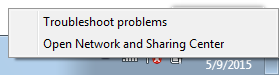
1. Right Clik  on Wifi Icon and choose Open Network and Sharing Center


2. Set A new Connection or Network and Choose Set Up Wireless ad hoc


3. Clik Next Untill asked network name and Scurity

Input Network Name and scurity  that you want


4.  After you fill up all, Clik  next and finally done, good luck


NOTE: Internet sharing with peer to peer ad hoc above use laptop to laptop only or personal computer with wifi injected. For smartphone tablet cant use tutorial above.

Thursday, November 21, 2013

Trik Mengatasi Download IDM yang Sudah 99,99% Macet

Temen Temen Sering download  dah  hampir selesai macet? 99,99% macet? kalo file cuman 2 MB 3MB gak terlalu pusing  masalahnya kalo dah dowload nyampai 3 Gg, waduhhh dah nunggunya lama bikin pusing aja ni ada salah satu solusi untuk mengatasi masalah itu pertama  download dulu freegate fersi terbaru  kalo aku pake yang ini fregate 7  silahkan temen temen cari yang terbaru, setelah itu  buka aja tu freegate seperti biasa. kemudian  buka idm kalian
pada menu downloads-->options--> proxy setting seperti gambar di bawah ini, ketik ok silahkan lanjutkan downloadnya

Sunday, January 1, 2012

Macam-macam Database

Project Database
Seiring dengan kemajuan teknologi hampir semua software maupun sistem informasi baik itu berbasis desktop ataupun berbasis Web harus diintegrerasikan dengan data base. Dimulai dari perkembangannya pertama kalinya data base pertama diciptakan oleh seorang yang jenius yaitu Larry Ellison dengan oraclenya. sampai sekarang teknologi database paling bagus dan paling baik adalah oracle. Seiring dengan perkembangan zaman banyak vendor-vendor perusahaan IT dunia berlomba-lomba untuk membuat database ternama lainnya salah satunya adalah Sql server punya Microsoft dan lain sebagainya.

Selengkapnya Daftar Database Baik yang berbayar maupun yang versi Gratis alias Open Source
1. Oracle 
2. Sql Server
3. Mysql
4.Microsoft Acces
5. Firebird
6.PostgreSQL

Wednesday, December 21, 2011

Mengatasi Ekstensi .CHK pada Flashdisk

Begini ceritanya,  Ada saudaraku yang disuruh untuk memfoto pesta perkawinan saudaranya. dia ditugasi untuk memfoto dan menyuting  acara pesta perkawinan saudaranya. Ketika sudah selesai memfoto dan menyuting, kebetulan dia hanya memakai  handycam, kartu memori yang ada di handycam di cabut langsung dipindahkan ke flash disk barunya, apesnya tidak memindahkan file foto dan videonya ke komputer dulu, dia langsung memindahkan file foto tersebut di cut langsung  ke flash disk miliknya. hehehe bagaimana mau mindahin ke komputer dulu wong dia pas mindahin file-filenya juga di warnet jadi dari kartu memori langsung di cut ke flashdisk. setlah selesai  meng cut file tersebut dia kaget file-file yang ada di flashdisk kok nggak ada malahan hilang semua alias tampilan dalam flash disk kosong. kemudian dia cek beberapa kali tancap masuk tetep nggak ada, sampai dia ke warnet lain tetep juga ga muncul tu file, tetapi dalam propertis di flash disk masih ada isinya.

Suatu ketika dia bertanya kepadaku tentang masalah itu ya aku jawab sederhana "paling paling ke hidden" sesuai pengalamanku kebanyakan flasdisk yang kaya gitu pasti file-filenya di hidden sama virus saya jawab pilih tool ==> view dan show hidden file  pasti bisa. Ternyata di coba-coba tetep nggak bisa muncul. Kemudian dia datang ke kosku langsung bawa flashdisknya dan aku praktikkan sesuai pengalamanku tak di show hidden file, show protected system, show extension tetep ga bisa kebukak, kemudian aku coba pakai attrib yang ada di dos tetep nggak bisa keluar. Hampir aku frustasi ku coba pakai windows Xp kemudian ta coba seperti diatas eh muncul folder dengan nama found.000, aku sempet seneng pas dah muncul folder tersebut, tetapi timbul masalah baru lagi yaitu semua file yang ada di dalam folder found.000 tersebut berextensi .CHK, file apa itu dalam benakku.

Kemudian saya punya inisiatif mengubah extensi CHK menjadi .jpg dan .mov karena sepengatahuan saya file poto yang defalut pada handycam adalah jpg dan videonya adalah mov jadi untuk file-file yang berukuran kecil saya beri extensi.jpg dan file yang rada besar aku beri extensi .mov, aku gembira sempat berhasil tetapi masih ada yang tidak bisa dibukak, Aku coba searching di google dan cari tahu apa itu format CHK ternyata file tersebut adalah extensi untuk recoveri pada windows untuk mengembalikannya anda bisa menggunakan aplikasi cukup ringan dan kecil yaitu unCHK cara penggunaannya cukup mudah file tersebut di extak di dalam folder yang filenya berextensi chk  tersebut  tinggal run tunggu proses recovery untuk menggunakannya anda bisa mengunduh di sini

Tapi kalau filenya hanya sedikit dan kita sudah tau extensi file tersebut, kita tinggal merename aja extensinya tetapi jika file nya banyak misalnya 500 atau lebih saya sarankan untuk memakai aplikasi tersebut

Monday, December 19, 2011

Sistem Informasi Stok Barang Sederhana dengan Delphi

Bagi temen-temen yang seneng dengan Pemrograman Delphi, ni ada contoh sistem informasi stok barang dengan delphi, sebenarnya ini adalah tugas kuliah aku, jangan diketawakan ya soalnya aku masih belajar bagi yang berminat bisa di unduh di sini

Tuesday, December 13, 2011

TIP TRIK FB. Mengganti Poto profile Menggunakan Hand Phone

Mungkin dari kalian semua sudah pada jagao dengan Facebook, ya aplikasi jejaring sosial nomer satu di dunia ini telah menghipnotis para penggunanya dengan berbagai macam layanan yang ada di dalamnya. Pada awalnya pengguna facebook hanya pada pengguna desktop atau komputer biasa, namun untuk sekarang ini kita juga dapat menggunakannya di hp kita masing-masing, karena hampir semua dari kita pada saat ini sudah mempunyai hp dan belum tentu memmpunyai kompuuter. mungkin itu juga menjadi suatu alasan dari pihak facebook untuk menambah anggotanya lewat hp.

Bagi pengguna facebook yanng menggunakan komputer mungkin tidak mendapatkan kesulitan untuk menjalankan  semua layanan yang ditawarkan dari facebook mulai dari chat, game, video call dan lainnya. Namun bagi pengguna hp banyak layanan yang tidak dapat diakses melalui hp, sebagai contoh untuk yang begitu kecil dan sepele yaitu mengganti poto profil. Banyak temen-temen yang belum tau bagaimana cara mengganti poto profil mereka melalui hp, bahkan sebagian dari mereka pergi ke warnet atau jasa internet lainnya hanya ingin merubah poto profil mereka.

Untuk masalah ini ada solusi buat anda yang menggunakan hp dan ingin mengganti poto profilnya di hp
1. Buka web browser di hp anda, saya sarankan menggunakan opera mini karena tampilannya akan penuh.
2. Tulislah http://facebook.com/editpicture.php di addres browser anda kemudian klik ok
3. Setelah itu anda disuruh untuk login terlebih dahulu, setelah login tampilan yang muncul pertama kali adalah tampilan untuk merubah poto profil tersebut. 

4. Kemudian  ambil poto yang ada di hp, ingat sebelum masuk ke facebook ingatlah nama foto yang akan anda upload karena ketika kita brows poto tidak akan terlihat tampilan poto tersebut seperti halnya tampilan thubnail yang ada di komputer, tetapi hanya namanya saja yang terlihat.
5. dan selesai, bagi anda yang kebetulan lagi internetan pake hp bisa langsung coba di sini


Monday, December 5, 2011

Membuat Aplikasi Media Player Sederhana Dengan Delphi

Delphi merupakan suatu aplikasi yang sangat mudah untuk kita membuat aplikasi-aplikasi lain. pada kali ini saya membuat sebuah aplikasi sederhana media player dengan delphi. media player ini bisa untuk memutar  file-file musik seperti mp3 dan file video untuk screen shootnya sperti ini


Bagi yang mau source kodenya di sini

Friday, November 11, 2011

Solution Over Heating in Windows 7 for Any Laptop

for users of laptop you may have experienced cases in latopnya Over heating, especially if you use windows 7. yes overheating, a problem which is quite troublesome, if the computer or laptop is overheating we have all our work seemed to be slow, as the plane seemed to walk. but wait a minute I have a solution to this problem.
the first steps:
1. check whether the wind drains dirty or not, if dirty clean using a compressor or other
2.
use coolpad  on your laptop is extremely helpful to better cool your laptop to avoid overheating.

The second step:
if the first step does not run smoothly it is better to try this step
1. power option click on more power option


\2. then click change plan setting
3. then choose change advanced power setting
4. in power options change percentage maximum processor state become 80% on battery  and Plugged in


I proved succesful,  good luck

Monday, November 7, 2011

Manual Setting GPRS and 3G for Indonesian Provider


Image GSM GPRS CDMA CDMA2000
By Admin

AXIS

for Setting Manual GPRS

Connection Name: AXIS (or Any)
Data Bearer: GPRS (Paket Data) atau PS
APN: AXIS
Username: AXIS
Password: 123456
Authentication: Normal
Proxy Address: 10.8.3.8
Proxy Port: 9201 atau 8080
Homepage: http://wap.axisworld.co.id
Connection Security: Off
Session Mode: Permanent

for Setting Manual MMS

Connection Name: AXISmms(or Any)
Data Bearer: GPRS (Paket Data) or PS
APN: AXISmms
Username: AXIS

Prompt Password: No
Password: 123456
Authentication: Normal
Proxy Address: 10.8.3.8
Proxy Port: 9201 atau 8080
Homepage: http://mmsc.axisworld.co.id
Connection Security: Off
Session Mode: Permanent


3 THREE

for Setting Manual GPRS 3 Three

Profil Name: 3 GPRS (or Any)
APN: 3gprs
Proxy Server Address: 10.4.0.10
Proxy Port Number: 3128
Data Bearer: GPRS (Paket Data)
Username: 3gprs
Password: 3gprs
Homepage: http://wap.three.co.id

for Setting Manual MMS 3 Three

Profil Name: 3 MMS
APN: 3mms
Proxy Server Address: 10.4.0.10
Proxy Port Number: 3128
Data Bearer: GPRS (Paket Data)
Username: 3mms
Password: 3mms
Homepage: http://mms.three.co.id


Indosat MENTARI


for Setting Manual GPRS Mentari

Profil Name: Indosat GPRS(or Any)
APN: indosatgprs
Proxy Address: 10.19.19.19
Port Proxy: 8080
Data Bearer: GPRS (Paket Data)
Username: indosat
Password: indosat
Homepage: http://wap.klub-mentari.com


for Setting Manual MMS Mentari

Profil Name: Indosat MMS
APN: indosatmms
Proxy Address: 10.19.19.19
Port Proxy: 8080
Data Bearer: GPRS (Paket Data)
Username: indosat
Password: indosat
Homepage: http://mmsc.indosat.com


Indosat IM3


Parameter Setting Manual GPRS IM3

Connection Name: M3-GPRS(or Any)
APN: www.indosat-m3.net
Username: gprs
Password: im3
Proxy Address: 10.19.19.19
Proxy Port: 9201 atau 8081
Homepage: http://wap.m3-access.com


for Setting Manual MMS IM3

Connection Name: M3-MMS
APN: mms.indosat-m3.net
Username: gprs
Password: im3
Proxy Address: 10.19.19.19
Proxy Port: 9201 atau 8081
Homepage: http://mmsc.m3-access.com

or you can use for global indosat(mentari,Im3)
here


APN: indosatgprs
User : indosat
Pass : indosat
Proxy : 10.19.19.19
Port : 8080/8580
Homepage : http://wap.indosat.com

APN: indosatmms
User : indosat
Pass : indosat
Proxy : 10.19.19.19
Port : 8080/8580
Homepage : http://mmsc.indosat.com


TELKOMSEL

Parameter Setting Manual GPRS Telkomsel

Profil Name: TSEL GPRS(or Any)

Data Bearer: Packet Data
APN: telkomsel
Username: wap
Prompt Password: No
Password: wap123
Authentication: Normal
Gateway IP Address: 10.1.89.130

Proxy Serv. Address: 8000
Homepage: http://wap.telkomsel.com
Connection Security: Off
Session Mode: Permanent

for Setting Manual MMS Telkomsel

Profil Name: TSEL- MMS (ar Any)

Data Bearer: Packet Data
APN: telkomsel
Username: wap
Prompt Password: No
Password: wap123
Authentication: Normal
Gateway IP Address: 10.1.89.130

Proxy Port Number: 8000
Homepage: http://mms.telkomsel.com
Connection Security: Off
Session Mode: Permanent


XL

Parameter Setting Manual GPRS XL

Profil Name= XL GPRS(or Any)
APN: www.xlgprs.net
Username: xlgprs
Password: proxl
Proxy Server Address: 202.152.240.50
Proxy Port: 8080/8580
Homepage: http://wap.lifeinhand.com
Data Bearer: GPRS (Paket Data)

for Setting Manual MMS XL

Profil Name= XL MMS(or Any)
APN: www.xlmms.net
Username: xlgprs
Promt Password: No
Password: proxl
Proxy Server Address: 202.152.240.50
Proxy Port Number: 8080/8580
Homepage: http://mmc.xl.net.id/servlets/mms
Data Bearer: GPRS (Paket Data)

for CDMA
smart
IP :10.20.27.250
port :8080/8580/8085
dial :#777 or 777 or #99
username : wap/smart
password :wap/smart

Freen
IP :10.20.27.250
port :8080/8580/8085
dial :#777 or 777 or #99
username :M8
password :M8

Browser Suppoorted HTML 5 Page Rank

Web Browsers are now increasingly heated competition. In connection with the issue or the development of HTML5 browser developers began vying to further enhance the ability and completeness of features on the browser to more support for HTML5. as it is known that HTML5 HTML5 is a new technology that is now still in progress. For browsers that are widely used browser in the virtual world are competing to be the best for the user and updating to better support into HTML5.

Here's a list ranking the best browser that supports HTML5 by html5test.com updated on aug 23th 2011

1st (First Place) : Google Chrome
Version 14.0.835
value : 340


2nd Mozilla Firefox
version 7
Value : 313


3rd Safari
Version 5.1
Value 293


4th
Opera mini
Version 11.50
Value : 286


5th Internet Eplorer
Version 9
Value :141


Sunday, November 6, 2011

Speed up Booting Windows

Any Problem about your booting Windows. must be waiting 3-4 minute hehehe


several tips for speed up your booting windows
1. Open Run
type "msconfig" OK
in start up tab unchecked all program
in service tab unchecked unnecessary services
2. Type in Run "regedit"
in "Edit" ==>"find "then type enableprefetcher
change extension integer from 3 becomes 5
good luck .....!!!

Wednesday, December 22, 2010

The Benefits of Blogging For Business

goes without saying that maintaining a blog is a good idea for the health of your business. Have you ever asked yourself Why? Being familiar with how blogs work and how to effectively utilize them for the health and wealth of your business will pay you back substantially for your efforts. Ineffective Blogging will simply waste your time, efforts, and this tremendous marketing tool.

Why does your business need a Blog? Credibility would be a good answer. Posting about news in your industry, links you'd recommend to topics related to your industry or post valuable information from the inside or your personal experiences, your readers will see you not only as a valuable information source but as a community minded business.

Building traffic and list building are two more reasons why your business needs a blog. These tools are Solid, Effective, and Proven Tools for marketing your Goods and Services Online.


Blogs are great for your customers.They're not seen the same as your basic website or sales page. Postings are usually informal. At times entertaining yet informative. Their accuracy and effectiveness will peak the interest of your readers, establish you as an Expert, and build trust between you and your readers.

Having the ability to offer subscriptions to your blog through sources loike bloglet.com, your readers can simply opt to recieve notices of your most recent postings, delivered directly to their inboxes. Provided your postings remain relevant to your readers wants and needs, they'll continually come to you first.


If you set up your blog to accept comments, this will give your readers the ability to post feedback on your posts. This will give you valuable insight and ideas regarding your next product or project.

How to build traffic with your blog. Your blog provider may provide potential readers the option of a search box. This tool gives the reader the ability to search for a particular blog using a word or phrase. By using those particular words or phrases in your title you'll boost your chances for acquiring some targeted traffic.

Don't forget to submit your blog to the search engines. Also remember, this is "The Information Super Highway". Blogging is information and the Search Engines Love them. After every post, Simply 'ping' your blog, (this announces
your update. I use http://www.pingoat.com/) and the search engines will pick it up.


So jump on the blogging bandwagon take advantage of one of the cheapest and smartest marketing tools available. It's easy and profitable - so build yours today!

Sunday, October 17, 2010

Cara Download video dari Youtube

Siapa yang tidak tahu tentang youtube. video berbagi gratis ini sangatlah populer bagi para user yang membutuhkan entertainmen, hiburan, tutorial, fakta sejarah, fakta ilmiah, tutorial,dan banyak yang lainnya. Semua video dalam youtube diupload oleh berbagai macam user dan gratis untuk menguploadnya. space yang didisediakan oleh youtube kepada kita sangat besar jadi jangan kuatir jika kita akan mengupload video yang sangat banyak sekalipun. Jumlah video yang ada di youtube menurut berbagai sumber beberapa tahun terakhir lebih dari 100 juta video, kalau sekarang pastinya lebih besar dari angka itu

Keberadaan youtube di dunia internet sangatlah banyak membantu bagi kalangan pelajar, mahasiswa bahkan untuk orang yang mau populer bisa mengupload videonya lewat youtube.
banyak contoh artis indonesia yang terkenal gara-gara youtube, pertama yaitu aksi dari sinta dan jojo dengan menyanyikan lagu lipsing keong racun.videonya sudah ditonton hampir 7,5 juta pemirsa. dan kemudian sekarang mereka mendadak menjadi artis. banyak lagi contoh ain seperti briptu norman kamaru polisi yang mendadak menjadi artis, dan yang paling heboh adalah ketenaran penyanyi cilik yang menjadi idola para remaja adalah kedatangan justin bieber yang tak lain kepopulerannya gara-gara youtube juga.

Banyak cara yang akan kita untuk mendownload konten video yang ada di youtube mulai dari cara mudah sampai sulit akan tetapi saya akan membantu untuk cara yang mudah saja

1. Menggunakan aplikasi Youtube Downloader


aplikasi ini sangat mudah digunaka tinggal copy url yang ada di youtube dan pastekan ke enter video url seperti gambar di atas sangat mudah. kita juga bisa mmemilih format video yang akan akan kita download, jadi aplikasi ini akan otomatis mengkonvert format video yang akan kita pilih seperti 3gp dan mp4.

2. Orbit Downoader


Seperti Youtube downloader orbit downloader juga bisa mendownload bideo dari youtube, bedanya kalau orbit selain bisa downoad video dia juga bisa download file file yang lain seperti format zip,doc,pdf dan lainnya. untuk fitur dowload video orbit menyajikan fitur tambahan yitu ada fitur flasvideo yang ada ditab lainnya.

3.Internet Download Manager


Kalau aplikasi ini yang paling ane demenin tidak usah repot reot copy paste urlnya yang dari youtube, kita tinggal play videonya kemudian akan muncul tawaran "download video from this page" atau "download audio from this page" kita lang sung klik tombol tawaran itu langsung jadi mudah banget. idm juga seperti orbit selain bisa download file video juga bisa download file lainnya.

Kalau mau download video yang tanpa aplikasi ada berbagai cara,

1. Kita mainkan video dari youtube tersebut sampai selesai, kemudian kita cari file chace dari web browser kita cari file yang besar kemudian file tersebut di rename extensinya jadi flv atau mp4, tetapi paling banyak digunakn di youtube adalah file flv. contoh ada data di chace dengan nama 2we2ue dengan besarnya 12mb maka kita tinggal merename nama tersebut menjadi 2we2ue.flv begitu mudah kan,,,,

2. Tambahkan kata kiss tepat di depan alamat youtube ya jadi kalu di url alamatnya begini youtube.com/blablabla kita tinggal nambahin kiss jadi kissyoutube/blablabla... kemudian lihat erintah selanjutnya.

3. Membuka alamat keepvid.com sama seperti you kiss tapi ini metodenya cuman copy url dari youtube kemudian pastekan di form url yang telah disediakan oeh keepvid.com

selamat mencoba


Saturday, October 16, 2010

Install xampp for linux

Step 1: DownloadSimply click on one of the links below. It's a good idea to get the latest version. :)A complete list of downloads (older versions) is available at SourceForge.A detailed overview over the changes and contents of all XAMPP releases is available in the RELEASE NOTES.
Step 2: Installation
After downloading simply type in the following commands:

Go to a Linux shell and login as the system administrator root:

su

Extract the downloaded archive file to /opt:

tar xvfz xampp-linux-1.7.3a.tar.gz -C /opt

Warning: Please use only this command to install XAMPP. DON'T use any Microsoft Windows tools to extract the archive, it won't work.

Warning 2: already installed XAMPP versions get overwritten by this command.

That's all. XAMPP is now installed below the /opt/lampp directory.
Step 3: Start
To start XAMPP simply call this command:

/opt/lampp/lampp start

You should now see something like this on your screen:

Starting XAMPP 1.7.3a...
LAMPP: Starting Apache...
LAMPP: Starting MySQL...
LAMPP started.

Ready. Apache and MySQL are running.

If you get any error messages please take a look at the Linux FAQ.
Step 4: Test
OK, that was easy but how can you check that everything really works? Just type in the following URL at your favourite web browser:

http://localhost

Now you should see the start page of XAMPP containing some links to check the status of the installed software and some small programming examples.


The Instant Art example: A small PHP/GD program (since 0.9.6pre1 also a flashy PHP/Ming example, see screenshot). Thanks to Anke Arnold for her font »AnkeCalligraph«.

A matter of security (A MUST READ!)
As mentioned before, XAMPP is not meant for production use but only for developers in a development environment. The way XAMPP is configured is to be open as possible and allowing the developer anything he/she wants. For development environments this is great but in a production environment it could be fatal.

Here a list of missing security in XAMPP:

The MySQL administrator (root) has no password.
The MySQL daemon is accessible via network.
ProFTPD uses the password "lampp" for user "nobody".
PhpMyAdmin is accessible via network.
Examples are accessible via network.
MySQL and Apache running under the same user (nobody).

To fix most of the security weaknesses simply call the following command:
/opt/lampp/lampp security
It starts a small security check and makes your XAMPP installation quite secure. For example this protects the XAMPP demo pages by a username ('lampp') and password combination.

See also our XAMPP for Linux FAQ.

Saturday, October 9, 2010

Application for measuring the speed of the flash

Who is not familiar with flash, a tiny hadware is very useful now, as a removable disk that is portable. but there are a few tips on choosing a flash of measuring speed. some software to measure the speed of the flash as follows 


Check Flash 

HD Speed

Crystal Disk 

MarkFlash 

Memory Toolkit


please search yourself on google app application of the above